第 10 章 裁剪和蒙版
裁剪路径
SVG 的默认裁剪区域为自身大小,超出部分将不可见(可通过设置 overflow 的值为 visible 改变)
可使用 <clipPath> 元素来建立自己的裁剪区域,其子级可以包含任意数量的基本形状、<path> 元素、<text> 元素
以 <rect> 为例。在 <clipPath> 元素内放置 <rect>,该矩形本身不会显示,应用时在要裁剪的对象上添加 clip-path 样式属性,值引用为 <clipPath> 元素即可
<!-- @format -->

<svg width="100%" xmlns="http://www.w3.org/2000/svg">
    <defs>
        <clipPath id="rectClip">
            <rect
                x="15"
                y="15"
                width="40"
                height="45"
                style="stroke: gray; fill: none"
            />
        </clipPath>
    </defs>

    <!-- 裁剪矩形 -->
    <circle
        cx="20"
        cy="20"
        r="20"
        stroke="gray"
        fill="blue"
        style="clip-path: url(#rectClip)"
    />
</svg>
曲线和文本的裁剪示例
<!-- @format -->

<svg width="100%">
    <defs>
        <clipPath id="curveClip">
            <path
                id="curve1"
                d="M5 55 C 25 5, 45 -25, 75 55, 85 85, 20 105, 40 55 Z"
                style="stroke: black; fill: none"
            />
        </clipPath>
        <clipPath id="textClip">
            <text
                id="text1"
                x="20"
                y="20"
                transform="rotate(60)"
                style="
                    font-family: 'Liberation Sans';
                    font-size: 48pt;
                    stroke: black;
                    fill: none;
                "
            >
                CLIP
            </text>
        </clipPath>
        <g id="shapes">
            <rect x="0" y="50" width="90" height="60" style="fill: #999" />
            <circle cx="25" cy="25" r="25" style="fill: #666" />
            <polygon points="30 0 80 0 80 100" style="fill: #ccc" />
        </g>
    </defs>
    <!-- 绘制曲线裁剪路径 -->
    <use xlink:href="#shapes" style="clip-path: url(#curveClip)" />
    <!-- 绘制文本裁剪路径 -->
    <use
        transform="translate(100, 0)"
        xlink:href="#shapes"
        style="clip-path: url(#textClip)"
    />
    <g transform="translate(0, 150)">
        <use xlink:href="#shapes" />
        <use xlink:href="#curve1" />
        <!-- 显示裁剪路径 -->
    </g>
    <g transform="translate(100, 150)">
        <use xlink:href="#shapes" />
        <use xlink:href="#text1" />
    </g>
</svg>
如果想根据对象的边界框来表示坐标,设置 clipPathUnits 为 objectBoundingBox 即可(默认值为 userSpaceOnUse)
<!-- @format -->
<svg width="100%">
<defs>
<clipPath id="circularPath" clipPathUnits="objectBoundingBox">
<circle cx="0.5" cy="0.5" r="0.5" />
</clipPath>
<g id="shapes">
<rect x="0" y="50" width="100" height="50" style="fill: #999" />
<circle cx="25" cy="25" r="25" style="fill: #666" />
<polygon points="30 0 80 0 80 100" style="fill: #ccc" />
</g>
<g id="words">
<text
x="0"
y="19"
style="font-family: 'Liberation Sans'; font-size: 14pt"
>
<tspan x="0" y="19">If you have form'd a circle</tspan>
<tspan x="12" y="35">to go into,</tspan>
<tspan x="0" y="51">Go into if yourself</tspan>
<tspan x="12" y="67">and see how you would do.</tspan>
<tspan x="50" y="87">—William Blake</tspan>
</text>
</g>
</defs>
<use xlink:href="#shapes" style="clip-path: url(#circularPath)" />
<use
xlink:href="#words"
transform="translate(110, 0)"
style="clip-path: url(#circularPath)"
/>
</svg>
<marker>、<symbol>、<svg>元素都会定义其自身的视口,也可以使用overflow: hidden样式来裁剪视口内容。如果内容的meet设置为preservveAspectRatio,视口可能比viewBox更大,要裁剪这个viewBox,就要创建一个<clipPath>元素,其中包含一个匹配viewBox最小x、最小y、宽度、高度的矩形
蒙版
蒙版的透明度对应被其覆盖的对象的透明度,即如果蒙版是透明的,则被蒙版覆盖的对象也是透明度
使用 <mask> 元素创建蒙版。使用 x、y、width、height 指定蒙版的尺寸。默认按照 objectBoundingBox 计算,如果想根据用户空间坐标计算尺寸,设置 maskUnits 为 userSpaceOnUse 即可
<mask> 元素子级中可以放置任意基本形状、文本、图形、路径来作为蒙版。这些元素默认使用用户空间坐标 userSpaceOnUse,设置 maskContentUnits 为 objectBoundingBox 即可变为使用对象边界框
SVG 使用如下公式计算蒙版的不透明度
(0.2125 * red value + 0.7154 * green value + 0.0721 * blue value) * opacity value
刚开始可能对各个色值使用的系数不相同而感到惊讶,但是如果看看完全饱和的红色、绿色、蓝色,则会发现绿色似乎最亮,红色较暗,蓝色最暗(下图中可看到)。颜色越暗,产生的阿尔法值越小,蒙版对象的不透明度越低。
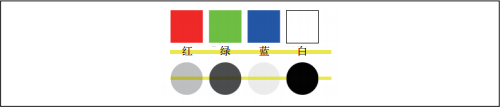
<!-- @format -->

<svg width="100%">
    <defs>
        <mask
            id="redmask"
            x="0"
            y="0"
            width="1"
            height="1"
            maskContentUnits="objectBoundingBox"
        >
            <rect x="0" y="0" width="1" height="1" style="fill: #f00" />
        </mask>
        <mask
            id="greenmask"
            x="0"
            y="0"
            width="1"
            height="1"
            maskContentUnits="objectBoundingBox"
        >
            <rect x="0" y="0" width="1" height="1" style="fill: #0f0" />
        </mask>
        <mask
            id="bluemask"
            x="0"
            y="0"
            width="1"
            height="1"
            maskContentUnits="objectBoundingBox"
        >
            <rect x="0" y="0" width="1" height="1" style="fill: #00f" />
        </mask>
        <mask
            id="whitemask"
            x="0"
            y="0"
            width="1"
            height="1"
            maskContentUnits="objectBoundingBox"
        >
            <rect x="0" y="0" width="1" height="1" style="fill: #fff" />
        </mask>
    </defs>
    <!-- 显示颜色以演示相对亮度 -->
    <rect x="10" y="10" width="50" height="50" style="fill: #f00" />
    <rect x="70" y="10" width="50" height="50" style="fill: #0f0" />
    <rect x="130" y="10" width="50" height="50" style="fill: #00f" />
    <rect
        x="190"
        y="10"
        width="50"
        height="50"
        style="fill: #fff; stroke: black"
    />
    <!-- 用于演示透明度的背景内容 -->
    <rect x="10" y="72" width="250" height="5" style="fill: yellow" />
    <rect x="10" y="112" width="250" height="5" style="fill: yellow" />
    <g style="mask: url(#redmask); font-size: 14pt; text-anchor: middle">
        <circle cx="35" cy="115" r="25" style="fill: black" />
        <text x="35" y="80">Red</text>
    </g>
    <g style="mask: url(#greenmask); font-size: 14pt; text-anchor: middle">
        <circle cx="95" cy="115" r="25" style="fill: black" />
        <text x="95" y="80">Green</text>
    </g>
    <g style="mask: url(#bluemask); font-size: 14pt; text-anchor: middle">
        <circle cx="155" cy="115" r="25" style="fill: black" />
        <text x="155" y="80">Blue</text>
    </g>
    <g style="mask: url(#whitemask); font-size: 14pt; text-anchor: middle">
        <circle cx="215" cy="115" r="25" style="fill: black" />
        <text x="215" y="80">White</text>
    </g>
</svg>
如果使用白色填充或者使用白色给遮罩内容描边,则上面公式中前半部分“颜色因子”结果为1,此时不透明度则是控制蒙版阿尔法值的唯一因素
<!-- @format -->

<svg width="100%">
    <defs>
        <mask
            id="fullmask"
            x="0"
            y="0"
            width="1"
            height="1"
            maskContentUnits="objectBoundingBox"
        >
            <rect
                x="0"
                y="0"
                width="1"
                height="1"
                style="fill-opacity: 1; fill: white"
            />
        </mask>
        <mask
            id="three-fourths"
            x="0"
            y="0"
            width="1"
            height="1"
            maskContentUnits="objectBoundingBox"
        >
            <rect
                x="0"
                y="0"
                width="1"
                height="1"
                style="fill-opacity: 0.75; fill: white"
            />
        </mask>
        <mask
            id="one-half"
            x="0"
            y="0"
            width="1"
            height="1"
            maskContentUnits="objectBoundingBox"
        >
            <rect
                x="0"
                y="0"
                width="1"
                height="1"
                style="fill-opacity: 0.5; fill: white"
            />
        </mask>
        <mask
            id="one-fourth"
            x="0"
            y="0"
            width="1"
            height="1"
            maskContentUnits="objectBoundingBox"
        >
            <rect
                x="0"
                y="0"
                width="1"
                height="1"
                style="fill-opacity: 0.25; fill: white"
            />
        </mask>
    </defs>
    <g style="font-size: 14pt; text-anchor: middle; fill: black">
        <g style="mask: url(#fullmask)">
            <circle cx="35" cy="35" r="25" />
            <text x="35" y="80">100%</text>
        </g>
        <g style="mask: url(#three-fourths)">
            <circle cx="95" cy="35" r="25" />
            <text x="95" y="80">75%</text>
        </g>
        <g style="mask: url(#one-half)">
            <circle cx="155" cy="35" r="25" />
            <text x="155" y="80">50%</text>
        </g>
        <g style="mask: url(#one-fourth)">
            <circle cx="215" cy="35" r="25" />
            <text x="215" y="80">25%</text>
        </g>
    </g>
</svg>